.svg)
.svg)
The component EMOSON needs
SOUND CARDS
To build a multichannel surround system with EMOSON, you need a sound card with analog outputs for each channel. The integrated audio chip on most motherboards only has 2 channels (stereo). A dedicated card — internal (PCI/PCIe) or external (USB) — gives you the 6 or 8 outputs EMOSON needs.
5.1 vs 7.1
• 5.1 = 6 channels: Front Left, Front Right, Center, Surround Left, Surround Right and LFE (subwoofer). EMOSON uses the LFE channel as another full-range speaker. With 3 pairs of speakers you have a 5.1 system.
• 7.1 = 8 channels: the 6 from 5.1 plus Side Left and Side Right. With 4 pairs of speakers you have a 7.1, with more precise sound source positioning.
PCI vs USB
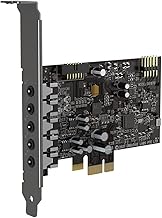
• PCI/PCIe (internal): installs inside the PC. Pros: lower latency, doesn't occupy a USB port, generally better DAC quality. Cons: requires opening the computer, only works in a desktop PC.
• USB (external): connects via USB cable. Pros: plug & play, works with laptops and desktops, easy to install. Cons: may have higher latency, occupies a USB port.
What matters for EMOSON
• Number of outputs: you need at least 6 analog outputs (3.5mm) for a 5.1, or 8 for a 7.1.
• Independent channels: each output must be a separate channel. Cards with only 2 outputs won't work.
• OS compatibility: most are plug & play, but verify compatibility with Windows or Mac.
• Latency: for real-time applications, lower latency is better. PCI cards usually win here.
Tips for EMOSON
• If you use a laptop, USB is your only option. Look for one with at least 6 outputs.
• For desktops, an internal PCI card offers better value and lower latency.
• Budget USB cards (under €25) work, but make sure they have 6 real outputs — some advertise 5.1 but only have 2 or 3.
• Once connected, configure the card to 5.1 or 7.1 depending on how many speakers you have.
Recommended Products
As Amazon affiliates, EMOSON earns a small commission on purchases made through these links, at no additional cost to you. Thank you for your support!
-
CREATIVE AUDIGY Fx V2
PCIe, 5.1, 24-bit/192kHz. Gaming and music.
-
CREATIVE AUDIGY Fx PRO
PCIe, 7.1, 120dB SNR. The highest tier.
-
CREATIVE SOUND BLASTER X4
USB external, 7.1, DAC, BT, mic input. Premium.
-
STARTECH 7.1 USB
USB external, 7.1, 24-bit. Reliable and proven.
-
LOGILINK UA0099
USB external, 5.1, 3 outputs. Affordable.
-
LEAGY USB 5.1
USB external, 5.1, 3 outputs. Most affordable.